Last week I wrote about a new Pushover custom connector we made for Claris Connect. What about sending push notifications directly from FileMaker? Is it possible? Yes, of course!
Pushover is a simple push notification service to instantly send alerts to Android and iOS devices.
You need the Pushover app on your device before you can receive any push notifications. You download the app from AppStore/Google Play for approx. 4-5 USD (one-time payment). Sending, and receiving, push notifications is then free of charge up to a generous monthly limit.
When you have purchased and downloaded the Pushover app for your iOS or Android device you need to create an account at Pushover.net, and connect your device. Please make note of your User key, you will need it when sending push notifications.
The next step is to create an application in Pushover. You will get an API token, please make note of that too. Make sure you copy all the characters in both the User key and the API token.
Now you are ready to send push notifications from FileMaker. Create a script with a couple of script steps, see image below.

In the first script step you define a JSON including the API token, User key, sound, title and message. There is a list of all available sounds at pushover.net, check the spelling. The title will become the header of the notification and message is the text you want to send.
JSONSetElement ( "" ;
  ["token"; "API TOKEN" ; JSONString];
  ["user"; "USER KEY" ; JSONString];
  ["sound"; "magic" ; JSONString];
  ["title"; "FileMaker Script" ; JSONString];
  ["message"; "Greetings from FileMaker" ; JSONString]
 )
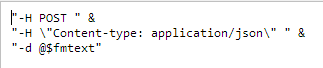
The JSON string is encoded in "utf-8" (line 2) before the push is sent using the Insert from URL script step (line 3). The cURL options are in more detail in image below.